User Guide
Overview
YAJCo is a tool for simple specification of languages and generation of language parser and language-supporting tools using only annotated Java classes. Each class represents one language concept and is equivalent to abstract syntax definition. Class can contain methods representing language semantics and annotations for specification of concrete syntax.
Each YAJCo project needs to have one @Parser annotation for specification of the root concept and other options.
In the next lines you can find out a little more about our great YAJCo tool, or you can go straight to examples project and play with them and then return to this user guide. Either way, if you feel like something is not right or missing from this user guide, please let us know.
Abstract Syntax Definition
Abstract syntax of the language consists of definition of language concepts and relations between them. In YAJCo language concepts correspond to classes, and therefore, each for class corresponding non-terminal in the grammar is defined.
Inheritance relation "is-a"
Inheritance or implementation of the interface indicates that one concept is a special case of its parent concept, i.e., it can be used in all places where the parent concept is expected. YAJCo automatically uses inheritance relation between classes to construct appropriate grammar rules.
| Classes | EBNF |
|---|---|
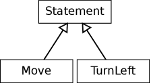 |
Statement ::= Move | TurnLeft |
public abstract class Statement {...}

public class Move extends Statement {...}

public class TurnLeft extends Statement {...}
Composition relation "has-a"
A concept is composed from other concepts when description of concept instance in an input sentence includes description of its subconcepts. In the grammar it is represented by the occurrence of non-terminals of subconcepts on the right-hand side of the rule corresponding to the composed concept.
| Classes | EBNF |
|---|---|
 |
Iteration ::= Expression Statement |
In object-oriented language this relation can be expressed using class fields that contain instances of subconcept classes. Not all fields, however, correspond to composition relation. Because of this YAJCo uses parameters of class constructor (or factory methods) for the specification of subconcepts. This also provides more flexibility for definition of concrete syntax as it defines the ordering of subconcepts.
class Iteration {
    ...
    public Iteration(Expression expression, Statement statement) {...}
}
In addition, the definition of composition on constructors allows adding some preprocessing and storing subconcepts in a different form.
Composition multiplicity
A concept can contain multiple instances of subconcepts. This is automatically inferred from the use of array or one of the standard Java collection types. The multiplicity can be restricted using @Range annotation.
YAJCo supports multiplicity with the following types:
- Java arrays
java.util.Listjava.util.Set
Referencing (aggregation)
A concept instance description can also contain a reference to an instance of another concept that is described elsewhere in the input sentence. In this case only some identifier (marked with @Identifier annotation) of the referred instance is provided as a part of the concept instance definition.
In the object model this relation can be expressed using aggregation. YAJCo again uses constructor parameters as a place, where the relation is described. In this case, the parameter is an identifier string marked with @References annotation. YAJCo would automatically resolve the reference and inject the actual object instance into the field with the same type so the constructor can actually ignore the received identifier.
A simple example of identifiers and references is provided in Nielsen's DESK language. For more information about this feature, you can check our paper Declarative specification of references in DSLs
Concrete Syntax Definition
Concrete syntax (notation) for each language concept is specified in a form of annotations attached to class constructors (and factory methods). Constructors allow describing how an object can be constructed from some input, so it is appropriate to use them also for constructing concept instances from the textual input of language sentence.
The annotations specify tokens that would be used in concepts' concrete representation. Most of the described annotations expect token specification as a parameter. Named tokens are defined in @Parser annotation in the @TokenDef option part. If a token is used only once, it can be specified directly in annotation. If a specified string does not represent an existing named token, it is taken as an exact character sequence to be used in concrete syntax.
Keywords and symbols
The simplest form of concrete syntax annotations is a definition of keywords and symbols that must be part of concept concrete representation. These tokens can be placed before or after the concept description using @Before and @After annotations associated with the concept constructor. Tokens can be also placed between description of subconcepts by using the same annotations on constructor parameters.
In a case of composition multiplicity, it is possible to specify tokens that must be placed between each instance of a subelement. This can be done with @Separator annotation.
Alternative notations
It may be possible to describe instances of the same concept using different notations and even with different combinations of subconcepts. This is allowed by the way of using multiple constructors
@Before("ITERATE")
Iteration(Expression expr, @Before("TIMES") Statement statement) {...}

@Before("ITERATE")
Iteration(Expression expr,
    @Before("TIMES") @After("END") Statement[] statement) {...}
Iteration ::= "ITERATE" Expression "TIMES" Statement
Iteration ::= "ITERATE" Expression "TIMES" Statement* "END"
Constructors that should not become part of the language definition can be marked using the @Exclude annotation.
Operator definition
Operators represent a type of language constructs that benefits from special treatment. Otherwise, they would require a more complex definition of concept relations to express rules of priority and assiciativity.
In YAJCo it is possible to mark a concept using @Operator annotation and define its priority and associativity. Annotation @Parentheses is used to indicate the possibility to use parentheses to explicitly express priority.
Tokens with value
Since language concepts can contain not only other concepts, but also primitive values, like numbers and strings, it is necessary to specify their concrete notation. This is done by attaching @Token annotation with a regular expression as a parameter to the parameter of the constructor. A string that matches the regular expression is then provided as a value of the parameter.
If you do not use @Token annotation YAJCo derives names of tokens from names of parameters. There are no predefined tokens in YAJCo, so every token needs to be defined in @Parser annotation or with annotations inside concept classes.
Examples of usage of @Token annotation are in all provided examples as it is a common task to mark parameters as input values.
YAJCo annotations
In the next section we will describe each annotation usable in YAJCo language specification.
Main annotations
@Before and @After
Parameter:
String[] value()- set of actual strings or names of defined tokens
- the main parameter => does not need to be named in code
Describes placement of language tokens in the concrete syntax of language. Can be used as an annotation on constructor, factory method and parameters in constructors and factory methods. Specified tokens in value parameter can be:
- actual textual representation of required tokens
- names of regex tokens defined with
@TokenDefinside@Parserconfiguration
@Separator
Parameter:
String value()- one string or name of defined tokens to be used as separator in list of elements
- the main parameter => does not need to be named in code
In case you need to specify a token for separation of elements used in array or list, this is the annotation you would need.
Use only on parameters of types:
- array -
Type[] ListSet
@Token
Parameter:
String value()- one name of defined token to be used as a regular expression to parse value for an annotated parameter
- the main parameter => does not need to be named in code
Since language concepts can contain not only other concepts, but also primitive values, like numbers and strings, it is necessary to specify their concrete notation. This is done by attaching @Token annotation with a name of a regular expression as a parameter to the parameter of the constructor. Regular expressions have to be specified inside @TokenDef in @Parser configuration annotation. A string that matches the regular expression is then provided as a value of the parameter.
In addition, if the constructor has parameters of primitive Java types like int or double, YAJCo automatically converts matched strings to the corresponding type.
Annotation @Token is not required in case that name of parameter and name of configured token is same (case-insensitive), it that case configured token is automatically maped to parameter.
@Token can be used on parameters of constructors and factory methods only.
or
    @Before("state")
    @After(";")
    public State(String id) { //parameter name identical with token name, @Token annotation not needed
        this.label = id;
    }
@Range
Parameters:
int minOccurs() default 0- defines the minimal number of occurrence of elements in the annotated list
int maxOccurs() default -1- defines the maximal number of occurrence of elements in the annotated list
- value
-1is used for infinity
A concept can contain multiple instances of subconcepts. This is automatically inferred from the use of array or one of the standard Java collection types. The multiplicity can be restricted using @Range annotation.
@Range can be used on array, List or Set typed parameters of constructors and factory methods only.
@Operator
Parameters:
int priority() default 1- defines priority for operator notation, higher number means higher priority
Associativity associativity() default Associativity.AUTO- defines associativity for operator notation, allowed values are
LEFT,RIGHT,NONE,AUTO(actually translates toLEFT)
- defines associativity for operator notation, allowed values are
Operators represent a type of language constructs that benefits from special treatment. Otherwise, they would require a more complex definition of concept relations to express rules of priority and associativity.
In YAJCo it is possible to mark concept using @Operator annotation and
define its priority and associativity.
@Operator can be used on constructors.
    @Operator(priority = 1, associativity=Associativity.LEFT)
    public Add(Expression expression1, @Before("PLUS") Expression expression2) {
        this.expression1 = expression1;
        this.expression2 = expression2;
    }
For better practical understanding, see Math expression language in examples or any other more complex example language.
@Parentheses
Parameters:
String left() default "("- defines a token used for left parentheses, can be specified also as a configured named token
String right() default ")"- defines a token used for right parentheses, can be specified also as a configured named token
Annotation @Parentheses can be used to indicate the possibility to use parentheses to explicitly express priority of operators. Usually annotations @Operator and @Parentheses are used in same language. In practical approach annotation @Parentheses is mostly used on abstract classes, which serve as parent for other more specific classes (language concepts).
@Parentheses can be used on classes.
For better practical understanding, see Math expression language in examples or any other more complex example language.
@Identifier
Parameter:
String unique() default ""- used to define the scope of uniqueness of the marked identifier field, scope is defined using XPath expression
YAJCo annotation @Identifier serves for easy specification of referencable identifiers in language concepts (classes). Most of the languages use some sort of referencable names (identifiers). It is possible to mark field of language concept with @Identifier annotation. Strings inputed to such field will be automatically checked for uniqueness during parsing of sentence. Standard behavious is checking uniqueness in global scope of a language sentence, but it is possible to specify own scope for uniqueness check using unique parameter.
public class Parameter {
    @Identifier(unique = "../yajco.example.imperative.model.function.Parameter")
    private final String name;
...
}
A simple example of identifiers and references is provided in Nielsen's DESK language. For more information about this feature, you can check our paper Declarative specification of references in DSLs
@References
Parameters:
Class value()- defines class of referenced language element
String field() default ""- defines the name of the class field in which the referenced element should be injected
String path() default ""- defines scope for searching referenced element in (as XPath expression)
boolean create() default false- states if YAJCo should create an element if the referenced identifier is not found (currently not implemented)
@References annotation is used to mark String parameters of constructors or factory methods. Such parameters represent places for referencing existing language structures.
During parsing YAJCo would inject proper references into the fields of objects using the Java reflection mechanism. Reference resolution can be restricted using XPath expression specifying nodes in the constructed object tree that would be searched for referred objects. This allows specifying scoping rules and namespaces.
It is required to specify the type of referencing class using value parameter. YAJCo automatically searches for a field with a specified type. If there are more types, it is necessary to use field parameter to exactly specify targeted field for injection with referenced language structure. Thanks to YAJCo automatic injection, it is not required to do anything with the actual value of the annotated parameter in the constructor (as it is possible to see in the examples below), value of String parameter is stored internally in YAJCo during the parsing phase.
...
private Function function;

public FunctionCall(
        @References(Function.class) String functionIdent,
        @Before("(") @After(")")
        @Separator(",") Expression[] expressions) {
    this.expressions = expressions;
}
...
...
private State source;

private State target;

@Before("trans")
@After(";")
public Transition(
       @Token("ID") String label,
       @Before(":")
       @Token("ID")
       @References(value = State.class, field = "source") String sourceLabel,
       @Before("->")
       @Token("ID")
       @References(value = State.class, field = "target") String targetLabel) {
  this.label = label;
}
...
A simple example of identifiers and references is provided in Nielsen's DESK language. For more information about this feature, you can check our paper Declarative specification of references in DSLs
@Flag
Parameter:
String value()- a string or name of a defined token to be used as a flag
- the main parameter => does not need to be named in code
Denotes a boolean property, where true is represented by the presence of the given token, and false is represented by its absence. The @Flag annotation can only be used on primitive boolean parameters of constructors and factory methods.
Suppose one of the states in a state machine definition DSL was defined as the initial one using the initial keyword. This could be specified in YAJCo by this constructor:
public State(@Flag("initial") boolean initial, @Token("ID") String name) {
    this.initial = initial;
    this.name = name;
}
A real-world example is the static keyword in Java. A static field is written as static int f;, while an instance field simply as int f; instead of instance int f;.
@FactoryMethod
Serves as marking annotation for specifying static methods, which will be included in creation of abstract syntax. Standard behaviour of YAJCo is to take all constructors as representation of concrete syntax for language concept (class). There can sometimes be problems with specification of all wanted concrete syntax notations with constructors, as they do not allow to have same signature even when annotations are different. Therefore it is sometimes required to create factory methods and mark them with our annotation.
@FactoryMethod
@Before("noop")
public static Statement createNoopStatement() {
...
}

@FactoryMethod
@Before("exit")
public static Statement createExitStatement() {
...
}
@Exclude
@Exclude annotation serves to mark constructor as excluded from abstract syntax specification. Any marked constructor will not be included in the language specification.
@Exclude annotation can also be used on a class. Such class will be excluded from the YAJCo language specification. It is necessary when you don't want some class, which is in the hierarchy of language concepts, to appear in language specification.
Config annotations
@Parser
Parameters:
String className() default ""- defines class name for generated parser
String mainNode() default ""- defines name of root language concept, can be in form of full class name or in simple class name in case class is in the same package; if annotation
@Parseris used on class, this parameter is not needed
- defines name of root language concept, can be in form of full class name or in simple class name in case class is in the same package; if annotation
TokenDef[] tokens() default {}- contains a list of named lexical symbols (tokens)
Skip[] skips() default {}- contains a list of parser skip rules (whitespace/comments/custom regex); if left empty, YAJCo automatically includes
\s
- contains a list of parser skip rules (whitespace/comments/custom regex); if left empty, YAJCo automatically includes
Option[] options() default {}- provides a way for configuration of YAJCo and modules
@Parser annotation is main configuration element of YAJCo tool. It is required to use this annotation once in a project in order to start YAJCo tool. @Parser annotation can be included on class or on package (using package-info.java file).
Its parameters allow specifying the root concept of the language, the name of the generated parser class. There is also specification of lexical analyzer, including definition of named tokens and regular expressions for substring that should be ignored (white-space, comments). And it is one of the few input points for configurations of YAJCo and any YAJCo module.
@Parser(className = "yajco.exemple.sml.parser.StateMachineParser",
        mainNode = "StateMachine",
        tokens = {
                @TokenDef(name = "ID", regexp = "[a-zA-Z][a-zA-Z0-9]*")
        },
        skips = {
                @Skip(whitespace = true),
                @Skip(lineComment = "#"),
                @Skip(blockComment = {"/*", "*/"})
        }) package yajco.example.sml.model;

import yajco.annotation.config.Parser;
import yajco.annotation.config.Skip;
import yajco.annotation.config.TokenDef;
@TokenDef
Parameters:
String name()- the name of lexical symbol (token)
String regexp()- regular expression for token
Used as part of configuration in @Parser annotation parameter tokens.
@Skip
Parameters:
String value() default ""- raw regexp to skip
boolean whitespace() default false- shorthand for
\s
- shorthand for
String lineComment() default "" new in YAJCo 0.7
- line-comment prefix (for example
//,#,--) - generates skip regexp
escape(prefix) + ".*" - also populates IR comment metadata
String[] blockComment() default {}- new in YAJCo 0.7
- block-comment delimiters
{start, end} - must have exactly two elements
- generates skip regexp
escape(start) + "(?:(?!" + escape(end) + ")[\\s\\S])*" + escape(end) - also populates IR comment metadata
String start() default "",String end() default "" deprecated in YAJCo 0.7
- legacy comment syntax, kept for backward compatibility
- prefer
blockComment = {start, end}
Priority inside one @Skip entry:
value > whitespace > lineComment > blockComment > deprecated start/end.
Used as part of configuration in @Parser annotation parameter skips.
@Option
Parameters:
String name()- name of the configuration option
String value()- value of the configuration option
Used as part of configuration in @Parser annotation parameter options.
Printer annotations
YAJCo allows generating printer for specified language. Printer allows to print model of language sentence in form of concrete syntax. In order to specify formatting of printed text, we have introduced new annotations.
@NewLine
Specifies place where should be put a new line in printer output. New line is put before annotated construct.
@Indent
Parameters:
int level() default 1- defines level of indentation
Specifies indentation of the annotated element. Mostly it should be used in combination with @NewLine. Annotated element is indented specified number of levels to right in the printer output. Indentation is inherited for all subelements of the indented element.
Restrictions
- Do not use
longorfloatJava primitives as types for YAJCo language specification constructors. They are not supported, yet. -
Language concept class must be inside a package. Default package classes are not permitted.
-
Each language concept class must be in the same package as main (root) language concept or in subpackages. It is not possible to have classes representing language concepts in completely different packages.